
Everything worth knowingbefore you press play.
Straight answers about what Riveo plays, where it runs, what it costs and how it treats your data. If something is missing, get in touch.
Free download. No account required. Riveo PRO is optional.
What Riveo is, in one paragraph
Riveo is a media player for Apple TV, iPhone, iPad, Mac, Android and Android TV. It connects to the sources you already own, Plex, Emby and Jellyfin servers, SMB, NFS, WebDAV and FTP shares, cloud drives and IPTV playlists, and shows them as one library. Riveo is a player only and ships completely empty. It does not include movies, channels or playlists; you connect the media servers, storage and playlists you already own or have the right to access.
Where can I get Riveo? +
Riveo is available now on the App Store for iPhone, iPad, Mac and Apple TV, and on Google Play for Android phones, tablets and Android TV.
What sources can I connect? +
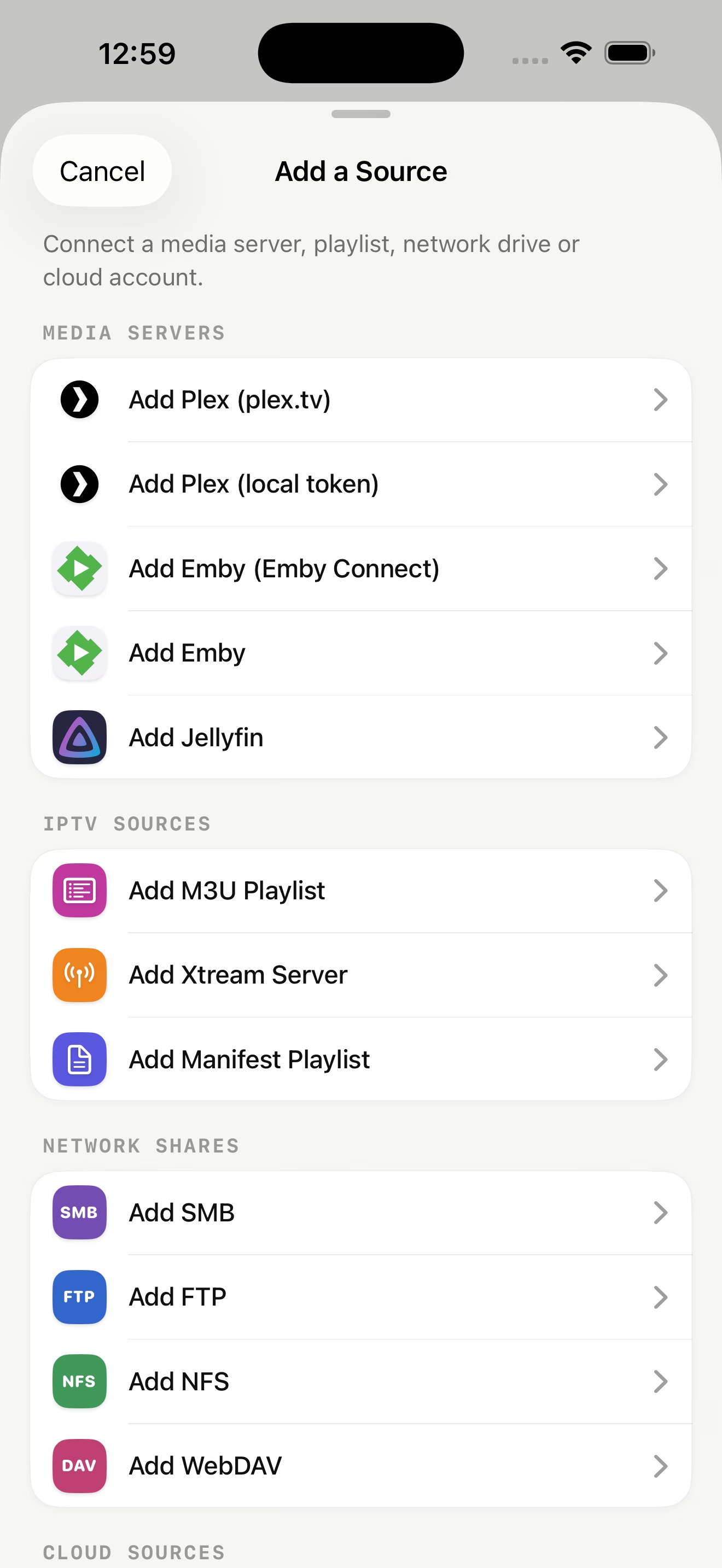
Riveo supports Plex, Emby, Jellyfin, M3U, Xtream and manifest IPTV playlists, SMB, NFS, WebDAV and FTP network shares, and the cloud drives Backblaze B2, Dropbox, OneDrive, pCloud and Koofr.
Which video formats does Riveo play? +
Riveo plays MKV, MP4, AVI, MOV and TS files, with 4K UHD, HDR10 and Dolby Vision video, multiple audio tracks, subtitles, Picture in Picture and AirPlay.
Does Riveo work with a Synology, QNAP or other NAS? +
Yes. Any NAS that exposes an SMB, NFS, WebDAV or FTP share can be added as a source, and Riveo plays the files directly from the share. Plex, Emby or Jellyfin running on the NAS can be added as media servers too.
Does Riveo include movies, channels, or playlists? +
No. Riveo is a player only and ships completely empty. It does not include movies, channels or playlists; you connect the media servers, storage and playlists you already own or have the right to access.
Which IPTV playlist formats are supported? +
Riveo loads M3U and Xtream playlists as well as manifest sources, shows a full programme guide, lets you search channels and set reminders for upcoming programmes.
Is Riveo free? +
Riveo is free to use and most features work at no cost. Riveo PRO unlocks additional features and is ad-free, offered as a monthly or annual subscription or a one-time Lifetime purchase. Current prices are shown in the app and on the store listing.
Do I need to create a Riveo account? +
No. There is no Riveo account, no ads and no tracking. Credentials are stored securely on your device, and on Apple devices compatible app data can sync through your private iCloud.
Which devices does Riveo run on? +
Riveo runs on iPhone, iPad, Mac, Apple TV and Apple Vision Pro (iOS 26, iPadOS 26, macOS 26, tvOS 26 and visionOS 26 or later) from the App Store, and on Android phones, tablets and Android TV from Google Play.
Does Riveo support 4K, HDR and Dolby Vision? +
Yes. Riveo plays 4K UHD, HDR10 and Dolby Vision video where the device and screen support it, including Apple TV 4K and Android TV.
Can I download videos for offline viewing? +
Yes. Titles from your servers, network shares and cloud drives can be downloaded to your device and watched without a connection.
Does Riveo support AirPlay and Picture in Picture? +
Yes, on Apple devices. Send video to an Apple TV or AirPlay-compatible television, and keep watching in a floating Picture in Picture window.
What is Riveo PRO and how much does it cost? +
Riveo PRO unlocks additional features and is ad-free. It is offered as a monthly or annual auto-renewing subscription, or as a one-time Lifetime purchase. Purchases go through the App Store or Google Play and are tied to that store account and platform; current prices are shown in the app.
Does Riveo track me or show ads? +
No. Riveo has no ads and no tracking, and there is no Riveo account. See the Privacy Policy for the full details.
How does sync between my Apple devices work? +
On Apple devices, compatible app data can sync through your private iCloud. Riveo never sees it; it moves between your devices through your own iCloud account.
How do I get help or report a problem? +
Email hello@riveo.io or use the contact page. Include the device, the source type (for example Plex, SMB or M3U) and what you expected to happen.
Ready to press play?
Riveo is available on the App Store for iPhone, iPad, Mac and Apple TV, and on Google Play for Android phones, tablets and Android TV.